Evaluating the End of School Editable Text Effect for Professional Design Workflows
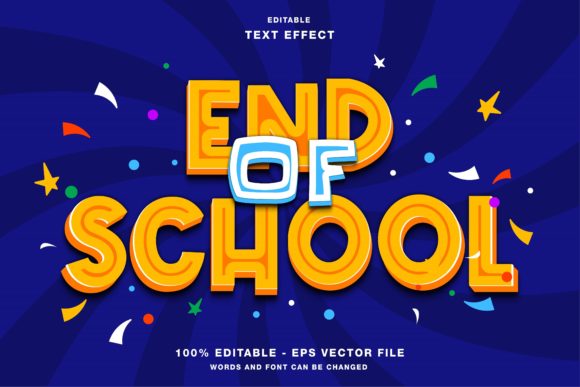
In the fast-paced world of digital marketing and graphic design, efficiency is often just as valuable as creativity. Whether you are a freelance designer managing multiple client deadlines, a small business owner handling your own promotions, or an educator preparing materials for the academic year’s conclusion, having access to high-quality, customizable assets can significantly streamline your workflow. One such asset that has gained attention in recent design cycles is the End of School - Editable Text Effect. This resource is not merely a static image but a fully customizable template designed for Adobe Illustrator, offering a blend of aesthetic appeal and technical flexibility.
For professionals who understand the nuances of vector graphics and typography, the value of an editable text effect lies in its adaptability. Unlike raster-based presets that lock you into specific dimensions or resolutions, this tool leverages the power of vector editing. It allows designers to maintain crisp, scalable visuals across various mediums, from social media headers to large-format print posters. By examining its features, usability, and practical applications, we can determine whether this asset fits into your current design toolkit.
Understanding the Core Features and Technical Specifications
The End of School - Editable Text Effect is built with professional standards in mind. At its core, it is an Adobe Illustrator file, which means it utilizes vector paths rather than pixels. This distinction is crucial for anyone involved in publication promotion, such as creating flyers, magazines, or event papers, where print quality is paramount. The primary advantage here is scalability; you can resize the text effect from a small Instagram story graphic to a massive banner without any loss in clarity or sharpness.
The package typically includes both EPS and JPG files within the main folder. The inclusion of EPS (Encapsulated PostScript) ensures compatibility with a wide range of vector editing software, although Adobe Illustrator remains the optimal environment for editing. The JPG files serve as quick-reference previews or ready-to-use placeholders for those who may not need to alter the design extensively. However, the true power of this asset is unlocked when you engage with the editable layers.
One of the most significant technical aspects to note is the color mode. This text effect is configured in RGB (Red, Green, Blue). RGB is the standard color model for digital displays, making this asset ideal for web designs, social media promotions on platforms like Instagram, Twitter, and Facebook, and any on-screen presentation. For designers planning to use this effect in printed materials, it is essential to understand the implications of RGB versus CMYK. While modern printers can handle RGB files, converting them to CMYK (Cyan, Magenta, Yellow, Key/Black) before final print production ensures that colors appear as intended on paper. This step requires a basic understanding of color management but is a standard practice in professional design workflows.
Practical Usability and Customization Flexibility
The term "editable" is often used loosely in the design resource market, but in the context of this End of School Text Effect, it refers to genuine structural flexibility. Users can easily edit all elements and change the text to suit their specific messaging. This level of customization is vital for branding consistency. For instance, a tutoring center might want to use the effect for a "Summer Enrollment Open" campaign, while a university might adapt it for "Graduation Ceremony 2024." The ability to swap out text while retaining the complex stylistic effects—such as shadows, gradients, or textures—saves hours of manual design work.
The usability extends beyond just text replacement. Because the elements are layered and organized, designers can tweak individual components. You might adjust the color palette to match a school’s official branding or modify the background elements to better suit a specific theme. This flexibility makes the asset suitable for a diverse range of users, from serious hobbyists experimenting with typography to seasoned marketers who need to produce consistent visual content quickly.
Furthermore, the learning curve associated with this tool is relatively low for anyone familiar with basic Illustrator functions. If you know how to select objects and type text, you can utilize this effect effectively. This accessibility broadens its appeal, allowing non-designers, such as educators or small business owners, to create professional-looking graphics without needing advanced technical skills. However, for those seeking deeper customization, the vector nature of the file allows for intricate adjustments to anchor points and paths, providing a ceiling for creativity that simple drag-and-drop tools cannot match.
Real-World Applications and Audience Fit
Who benefits most from the End of School - Editable Text Effect? The answer spans several industries and roles. Educators and school administrators can use it to create engaging announcements for end-of-year events, award ceremonies, or summer program registrations. The visual impact of a well-designed text effect can increase engagement rates on social media posts, ensuring that important information reaches parents and students effectively.
For marketers and entrepreneurs, this asset is a valuable resource for seasonal campaigns. The end of the school year is a peak season for various businesses, including retail stores offering back-to-school sales, travel agencies promoting family vacations, and entertainment venues hosting youth events. Using a pre-designed, high-quality text effect allows these businesses to maintain a professional aesthetic while reducing the time spent on graphic creation. This efficiency translates directly into cost savings and faster turnaround times for promotional materials.
Freelance designers and creative agencies will also find value in this tool. It serves as an excellent starting point for client projects, providing a solid foundation that can be customized to meet specific brand guidelines. By using such assets, designers can focus more on strategy and concept development rather than getting bogged down in the technical execution of complex text styles. This shift in focus can enhance the overall quality of the deliverable and improve client satisfaction.
Quality, Consistency, and Long-Term Value
When evaluating any design resource, quality and consistency are key indicators of long-term value. The End of School - Editable Text Effect demonstrates a high level of craftsmanship in its construction. The vectors are clean, the layers are logically named, and the effects are applied in a non-destructive manner where possible. This attention to detail ensures that the file remains easy to work with, even after multiple edits.
Consistency is another critical factor. In branding, maintaining a uniform look across different platforms is essential for recognition and trust. This text effect provides a consistent visual style that can be adapted across various formats. Whether you are creating a square post for Instagram, a landscape banner for Facebook, or a vertical flyer for print, the underlying design principles remain intact. This consistency helps reinforce brand identity and makes your communications more recognizable to your audience.
From a long-term perspective, investing in high-quality editable assets like this one can yield significant returns. Unlike one-off designs that serve a single purpose, an editable template can be reused and repurposed for years. You might use the same base effect for different holidays, events, or campaigns simply by changing the text and colors. This reusability maximizes the return on investment and reduces the need to constantly purchase new design resources.
Potential Limitations and Considerations
While the End of School - Editable Text Effect offers numerous advantages, it is important to acknowledge its limitations to set realistic expectations. As mentioned earlier, the RGB color mode is optimized for digital use. Designers intending to use this for high-end offset printing must be prepared to convert colors and potentially adjust saturation levels to account for the differences between screen and print. Failure to do so may result in colors that appear duller or shifted in the final printed product.
Additionally, while the file is editable, it requires Adobe Illustrator or compatible vector software. Users who rely solely on raster-based programs like Photoshop or online design tools may find it challenging to integrate this asset into their workflow without converting it first, which could compromise its scalability. Therefore, assessing your current software capabilities is a necessary step before purchasing or downloading such resources.
Finally, while the effect is customizable, it is still a template. Overuse of popular templates can lead to a lack of originality if not modified sufficiently. Designers should strive to add unique elements or combine this text effect with other custom graphics to ensure their final output stands out in a crowded digital landscape.
Final Thoughts on Integrating This Asset into Your Workflow
The End of School - Editable Text Effect represents a practical solution for designers and content creators looking to balance quality with efficiency. Its vector-based structure, ease of customization, and versatility across digital and print mediums make it a valuable addition to any design library. By understanding its technical specifications and potential applications, you can leverage this tool to enhance your visual communications, save time, and maintain a professional standard in your projects. Whether you are promoting an event, designing a social media campaign, or creating educational materials, this asset offers the flexibility and reliability needed to achieve your goals effectively.