Mastering the Garuda Pancasila Editable Text Effect for Professional Designs
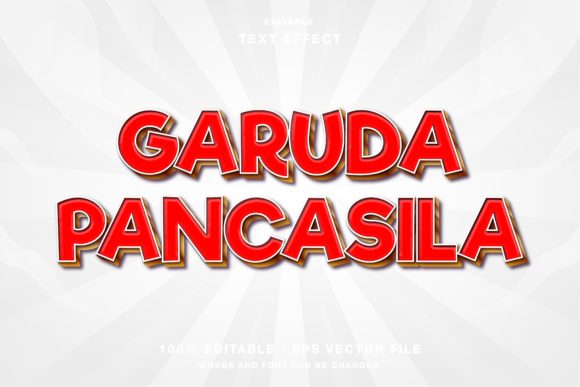
Integrating national symbolism into modern graphic design requires a delicate balance between respect for tradition and contemporary aesthetic appeal. The Garuda Pancasila Editable Text Effect offers a streamlined solution for designers who need to produce high-quality, culturally resonant visuals without starting from scratch. Whether you are crafting social media headlines for Instagram and Twitter or designing printed materials like flyers, posters, and magazines, this template provides a versatile foundation. However, many creators overlook critical technical details that can compromise the final output. Understanding how to properly utilize this resource ensures your designs remain professional, scalable, and visually impactful.
Understanding the Versatility of the Template
This specific text effect is engineered for Adobe Illustrator, making it an ideal choice for vector-based workflows. Unlike raster-based effects that lose quality when resized, this template allows you to scale your typography infinitely while maintaining crisp edges. The primary advantage lies in its editability. Every element is customizable, meaning you are not locked into a static image. You can change the text to suit specific campaigns, adjust colors to match brand guidelines, and modify layout components to fit various formats.
The inclusion of both EPS and JPG files in the main folder adds another layer of convenience. The EPS format preserves the vector data, allowing for deep customization within Illustrator, while the JPG serves as a quick reference or a ready-to-use asset for platforms that do not support vector uploads. This dual-format approach caters to both web designers who need quick assets and print professionals who require high-resolution scalability.
Common Mistakes When Using National Symbolism in Design
While the template simplifies the technical execution, several conceptual and technical errors frequently occur. Recognizing these pitfalls early can save time and prevent embarrassing revisions.
Ignoring Color Mode Specifications
One of the most frequent oversights involves the color mode. This template is provided in RGB color mode, which is optimized for digital screens such as monitors, smartphones, and tablets. Many beginners mistakenly assume that because they are creating a "professional" document, they should immediately convert everything to CMYK for print. While CMYK is standard for offset printing, converting an RGB-designed effect prematurely can result in dull, washed-out colors that lack the vibrancy intended by the original designer.
The Correction: If your primary goal is web design, social media promotions, or digital publications, keep the file in RGB. Only convert to CMYK if you are sending the final file to a professional printer, and even then, do so at the very end of your workflow. Check the color profile settings in Illustrator before exporting to ensure consistency across devices.
Misunderstanding Editability Limits
Another common misunderstanding is assuming that "editable" means "automatically perfect." Some users expect the text effect to adapt magically to any phrase length or font style without manual adjustment. In reality, complex text effects often rely on specific kerning, tracking, and path alignments. Replacing the placeholder text with a significantly longer or shorter phrase can disrupt the visual balance, causing overlapping elements or awkward whitespace.
The Better Approach: After inserting your custom text, spend time adjusting the character panel settings. Modify the tracking to ensure even spacing and check for any clipped paths. Use the Direct Selection Tool in Illustrator to tweak anchor points if the text effect does not wrap naturally around your new content. This extra step ensures the design looks intentional rather than automated.
Neglecting Cultural Context and Respect
When using symbols like the Garuda Pancasila, it is crucial to remember the cultural weight they carry. A frequent error is treating the symbol merely as a decorative element without considering its placement and context. Using the effect for trivial or inappropriate commercial promotions can appear disrespectful and may alienate your audience.
Practical Advice: Always evaluate the tone of your message. Ensure that the use of the Garuda Pancasila aligns with values of integrity, unity, and national pride. Avoid distorting the symbol excessively or combining it with clashing visual elements that detract from its dignity. The template provides the aesthetic structure, but the responsibility for respectful usage lies with the creator.
Technical Considerations for Optimal Results
To get the most out of the Garuda Pancasila Editable Text Effect, you must pay attention to the technical environment in which you are working. Here are key factors to check before finalizing your design.
- Software Compatibility: Ensure you are using a version of Adobe Illustrator that supports the features used in the template. Older versions may not render certain gradient meshes or opacity masks correctly, leading to visual glitches.
- Font Licensing: If the template uses specific fonts, verify that you have the proper licenses for commercial use. If you replace the font, choose one that complements the bold, authoritative nature of the Garuda symbol. Serif fonts often convey tradition, while clean sans-serifs offer a modern twist.
- Resolution for Export: When exporting for web use (Instagram, Facebook, Twitter), export at 72 DPI or 150 DPI for retina displays. For print materials like flyers and posters, ensure you are working with high-resolution assets and consider the bleed area if the design extends to the edge of the paper.
Enhancing Efficiency in Your Workflow
Using pre-made templates is not just about saving time; it is about maintaining consistency across multiple platforms. For marketers and entrepreneurs managing campaigns across Instagram, Twitter, and Facebook, having a unified visual identity is crucial. This template allows you to create a cohesive look for event papers, magazine spreads, and digital ads simultaneously.
To maximize efficiency, create a library of variations. Save different color schemes and text configurations as separate AI files. This way, when a last-minute promotion arises, you do not need to rebuild the effect from scratch. Instead, open the relevant variant, update the text, and export. This systematic approach reduces stress and minimizes the risk of errors during tight deadlines.
What to Check Before Finalizing Your Design
Before you publish or print, perform a thorough review. Zoom in to 400% to check for stray anchor points or misaligned paths. Verify that all text is spelled correctly and that the hierarchy of information is clear. Ask yourself: Does the text effect enhance the message, or does it overpower it? The goal is clarity and impact, not just visual complexity.
Additionally, test your exported files on different devices. Colors can vary significantly between an OLED smartphone screen and a standard laptop monitor. Viewing your design on multiple screens ensures that the RGB values translate well across the diverse range of devices your audience uses.
In conclusion, the Garuda Pancasila Editable Text Effect is a powerful tool for designers seeking to blend national heritage with modern graphic standards. By avoiding common technical mistakes, respecting cultural contexts, and leveraging the flexibility of vector editing, you can create compelling visuals that resonate with your audience. Whether you are a beginner learning the ropes or a seasoned professional streamlining your workflow, this template offers a robust foundation for high-quality design outcomes.